The short answer
An invoice is easier to pay when the customer can immediately answer five questions: who sent it, what was delivered, what is owed, when is it due, and how can payment be made? You don't need an expensive accounting system to make a clear invoice. You do need accurate details, a consistent number, agreed terms, and a way to track whether the payment arrived.
A clear invoice will not make a customer pay who cannot or will not pay. But it can remove avoidable questions and misunderstandings that hold up otherwise routine payments.
Follow along with a real invoice-tracking screen
Our invoice tutorial uses a fictional service business, Lakeview Home Services, billing Oak Street Café for two maintenance visits. At $125 each, the service subtotal is $250. A previously paid $50 deposit leaves a $200 balance due. Put that math in the description instead of quietly billing the whole amount again.
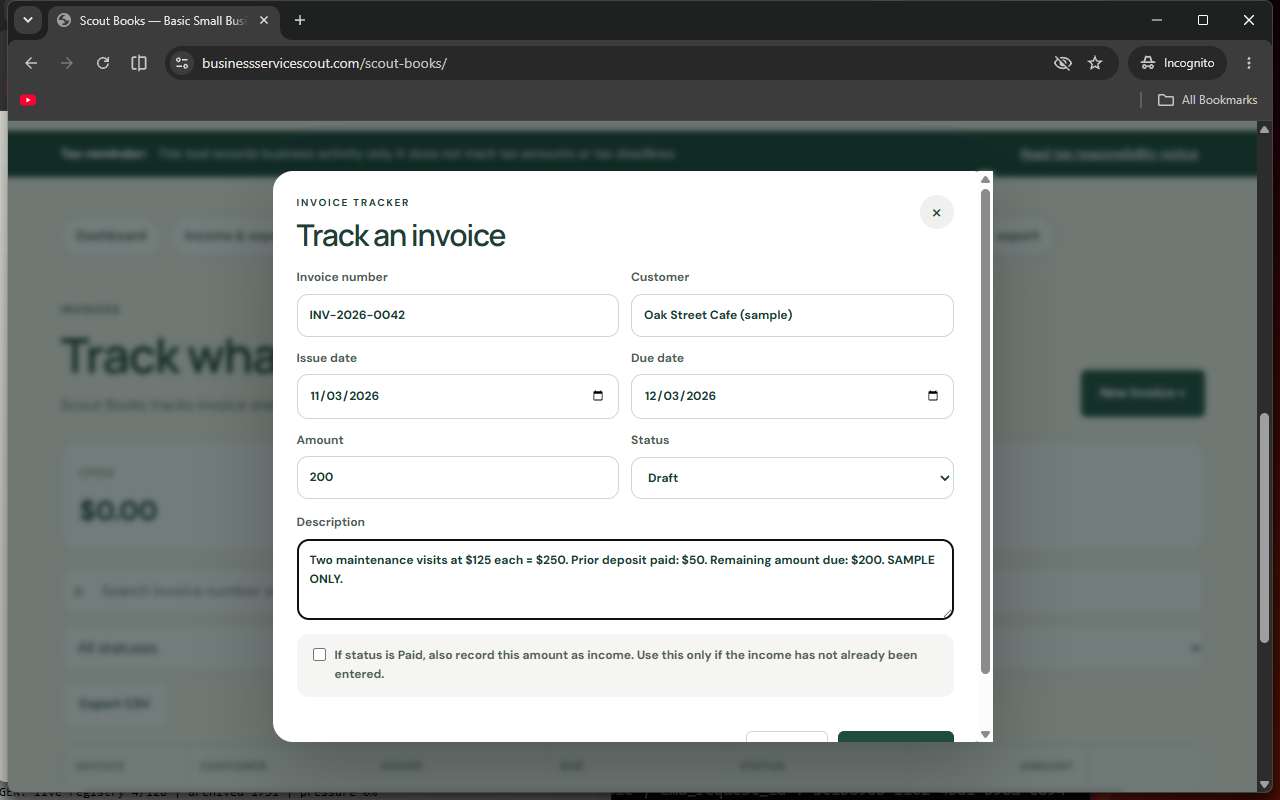
Try it yourself: Open the free Scout Books invoice tracker, add the fictional customer, enter invoice INV-2026-0042, set November 17 as the due date, and record $200 as the amount still owed. Review a printable copy before sending it through your own billing channel.
Watch: How to make a professional invoice for free
Follow our nine-minute video walkthrough, narrated using Larry's synthesized voice, then try the same fictional invoice example in Scout Books. The video explains the $250 service invoice, the $50 deposit already paid, and the $200 still owed.
Watch the full tutorial on YouTube (9 minutes 7 seconds). The examples use fictional business names. Scout Books doesn't email invoices, process payments, or calculate or file taxes.
Start with the agreement, not the invoice template
Before beginning work, write down what the customer is buying and when payment is expected. A fixed-price design project, a weekly cleaning job, and a repair visit have different billing rhythms. Agree whether the customer is paying a deposit, a milestone payment, or the full amount after completion. If taxes, materials, travel, or rush charges may apply, discuss them before the final bill arrives.
For new customers, confirm the legal business name or billing contact, preferred delivery email, purchase-order requirements, and whom to contact about questions. Large customers often need a purchase-order number or special portal; sending a perfect-looking PDF to the wrong address does not solve that problem.
Include these nine pieces of information on every invoice
- Your business identity. Show the name customers recognize and accurate contact details. Add a business address if appropriate.
- Customer and billing contact. Use the correct customer name and address or business department.
- Unique invoice number. A sequence such as INV-2026-0042 makes it easier to reconcile and discuss a payment.
- Invoice issue date. Mark when the invoice was created or delivered.
- Due date and payment terms. Use a specific date, not only a phrase like “soon.”
- Itemized description. Name the work, quantity, unit price, service dates, or project milestone so the buyer can recognize it.
- Totals. Display any agreed discounts, applicable tax, deposits already paid, and remaining amount clearly.
- Accepted payment methods. State the actual way to pay and where the customer can get help. Don't include sensitive account information unless necessary and secure.
- Questions and corrections. Give a real contact method so an ordinary mistake can be fixed promptly.
The invoice should be easy to understand without opening a contract to decode an item. If the project was “Replace three exterior lights,” make that visible. “General services” is vague enough to cause an avoidable email exchange.
A practical invoice example
Invoice INV-2026-0042
Customer: Oak Street Café. Service: two routine maintenance visits completed October 14 and October 21. Quantity: 2 visits at $125 each. Subtotal: $250. Prior deposit: $50. Amount due: $200. Invoice issued November 3; due date November 17. Payment instructions: use the secure method previously agreed with the café; contact the listed billing email with questions.
The amounts and names here are invented solely to illustrate formatting. Real invoicing and tax treatment depend on your service, agreement, and location.
The key is that both sides can independently check the remaining balance. If a customer says they already paid $50, the invoice already shows it. If they dispute the second visit, the description and dates tell you exactly what to investigate.
Choose payment terms that fit the work
“Due on receipt” is a different expectation from a stated future due date. For ongoing clients, agree on a schedule before sending the first bill. With deposits or milestones, invoice against the agreed stage of work rather than surprising the customer with a total they did not expect.
Put any late-payment terms in the original agreement and check whether they comply with applicable law. Do not invent a fee after an invoice becomes overdue. Keep invoices consistent when multiple employees send them so customers are not learning a new process each month.
Send the invoice where it will be processed
Ask customers whether the invoice should go to the person who requested the work, an accounts-payable inbox, or a portal. Verify the recipient's contact details rather than guessing. An attachment with a helpful filename such as “INV-2026-0042-Oak-Street-Cafe.pdf” can be easier to retrieve later than “invoice-final-new2.pdf.”
For security, avoid emailing customers a new bank account number out of the blue, especially after an existing payment process has been established. Fraudsters sometimes impersonate businesses to change payment instructions. The FTC's small-business invoice-scam warning encourages independent verification of suspicious bills and payment requests.
Follow up professionally without losing track
Create a simple follow-up calendar linked to the due date. A friendly reminder before or shortly after the date can include the original invoice number, amount, and a question about whether anything needs clarification. Keep a record of every reminder, partial payment, credit, and corrected invoice.
Avoid sending repeated automated messages without checking whether the payment has already arrived. The customer may have paid by check, initiated an ACH payment that has not settled, or disputed a line item. Reconcile the bank activity and document the reason for any outstanding amount before escalating.
Use a small-business tracker before you buy a full accounting suite
For owners who send only a handful of invoices, a simple system can be sufficient to prepare printable invoices and track the underlying income and expenses. Scout Books, our free lightweight business tracker, includes customer/vendor records, invoice creation, a printable invoice view, income and expense entries, and local data backup/export. It is intended for basic records, not comprehensive payroll or tax preparation.
Important: Scout Books does not calculate, withhold, file, or pay taxes for you, and it isn't a substitute for a professional accountant. Back up your data regularly. If your workflow requires bank synchronization, online card collection, automatic reminders, or advanced reporting, compare a specialist invoicing or accounting service instead. Our invoicing versus accounting software guide helps separate those needs.
A five-minute invoice review before sending
- Confirm the customer name, purchase order, and billing address.
- Check quantities, dates, discounts, taxes, deposits, and total due.
- Read the due date and the agreed payment terms.
- Check the payment instructions and contact email.
- Save a copy and record the invoice in a tracker.
- Schedule an appropriate reminder and mark it paid only when verified.
That short routine can matter more than adding another decorative logo or changing the font on your invoice.
Common questions
Do I need software to send an invoice?
Not necessarily. A clear template or basic tracker may be enough for a very small business, provided you maintain complete and accurate records and fulfill any applicable legal requirements.
Should I put bank details on invoices?
Only if necessary for the payment method and handled securely. If a customer already has payment instructions, unexpected changes create fraud risk.
Can a free invoice tool do my taxes?
Not automatically. Many tools organize records but do not calculate, withhold, file, or pay taxes. Verify exactly what a tool does before relying on it.
Invoice records and payment safety
- FTC — Verify unexpected small-business invoices and payment requests
- U.S. Small Business Administration — Managing business finances
Business terms, recordkeeping, and sales-tax requirements vary by jurisdiction. Review your specific obligations.